

 WordPress Services
 Shopify Services
 Webflow Services
How to Design a Shopify Website
Welcome to our blog where we share easy-to-follow tips, ideas, and updates. Whether you're building websites or running an online store, you'll find helpful content to learn and grow.
 AuthorIntegriti StudioJune 2, 2026
A well-designed Shopify website is highly important to engage and retain customers. Whether you have launched a completely new store or revamped an existing online store, having a well-structured Shopify site in context to website design ensures a quite seamless shopping experience.
In this blog, we will highlight the essential steps to designing a website. Covering almost everything from Shopify theme selection to mobile optimization. Whether you are a total beginner or working with a Shopify website designer, this blog will help you completely understand the process of creating a very user-friendly and visually appealing Shopify web design or Shopify store design.
Why Shopify for eCommerce?
Shopify is a highly well-known eCommerce platform due to its ease of use, extreme scalability, and unique customization options. Unlike other platforms that require highly complex coding, Shopify makes it easy for business owners to set up their website very quickly with very intuitive design tools and complete built-in features.
A design agency or individual developers can help highly enhance the platform’s default capabilities. However, even without technical expertise, you can build your site or design a beautiful store with completely unique tools and resources, including no-code options and app store integrations.
Step-by-Step Guide to Designing a Shopify Website
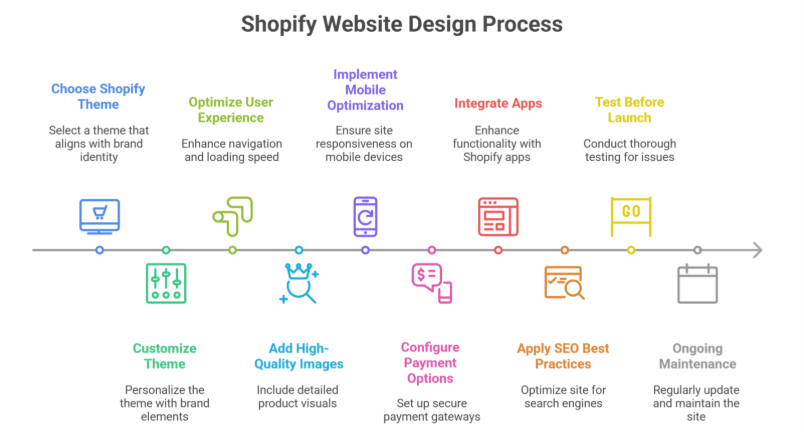
1. Choosing the Right Shopify Theme
Your themes highly determine the entire look and feel of your site. Shopify provides free and paid themes that cater to specific business needs. To select the best theme:
- Consider your brand identity and aesthetics.
- Ensure the theme is mobile-responsive.
- Look for customization options.
- Check customer reviews and ratings.
- Test the demo version before committing.
If you need more flexibility, hiring a professional designer or developer can help create a completely custom template tailored to your business’s unique requirements.
2. Customizing the Theme
Once you’ve chosen a theme, the next step is to customize your store. Shopify allows you to highly modify your store’s complete appearance using the theme editor. Key customizations include:
- Changing fonts and color schemes.
- Uploading a high-resolution logo.
- Adjusting homepage layout and sections.
- Adding promotional banners and sliders.
- Configuring the navigation menu for easy browsing.
3. High Optimizing for User Experience (UX)
A well-designed website focuses highly on user experience to keep visitors very engaged. Consider the following UX principles:
- Clear Navigation: Ensure menus and categories are easy to understand.
- Fast Loading Speed: Optimize images and remove unnecessary scripts.
- Simple Checkout Process: Reduce cart abandonment by offering a quick checkout.
- Consistent Branding: Maintain uniform colors, fonts, and styles.
Shopify design agency can help fine-tune these elements for maximum conversions.
4. Adding High-Quality Images & Product Descriptions
Your product pages are the heart of your online store. To make them effective:
- Use high-quality images with multiple angles.
- Include Zoom functionality for better viewing.
- Write detailed product descriptions highlighting features and benefits.
- Add customer reviews and ratings to build trust.
5. Implementing Mobile Optimization
With a majority of online shoppers using mobile devices, ensuring a mobile-friendly site is quite crucial. Shopify themes are inherently responsive, but additional steps include:
- Using a mobile-friendly menu.
- Ensuring buttons and CTAs are easily tappable.
- Optimizing image sizes to prevent slow loading.
- Testing the site on multiple devices before launch.
6. Configuring Payment & Shipping Options
A very seamless checkout process is pretty vital for conversion rates. Shopify integrates with multiple payment gateways, allowing customers to pay via credit cards, PayPal, or many other methods. Set up:
- Secure payment options with Shopify Payments.
- Transparent shipping policies.
- Tax calculations based on customer location.
- A return and refund policy for clarity.
7. Integrating Apps for Enhanced Functionality
Shopify’s App Store offers quite numerous plugins to enhance your store functionality. Some must-have apps include:
- SEO apps to improve search rankings.
- Live chat support for real-time assistance.
- Email marketing tools to boost customer engagement.
- Abandoned cart recovery apps to increase sales.
These tools ensure a smooth user experience and improved performance.
8. Complete Search Engine Optimization (SEO) Best Practices
To attract complete organic traffic, implement SEO strategies:
- Use relevant keywords in product descriptions and meta tags.
- Optimize URLs for readability.
- Write informative blog posts related to your products.
- Use alt tags for images.
- Submit your total sitemap to Google Search Console.
SEO plays quite a significant role in bringing visitors to your store without relying solely on paid ads.
9. Testing Before Launch
Before going live, conduct a thorough test of your site:
- Check for broken links.
- Ensure all pages load correctly on different devices.
- Test the checkout process.
- Verify email notifications.
- Run speed tests using tools like Google PageSpeed Insights.
Addressing these issues beforehand ensures a highly smooth launch with very minimal technical glitches.
10. Ongoing Maintenance & Updates
A Shopify website isn’t just a one-time project. Regular maintenance helps keep your store updated and secure. Best practices include:
- Updating plugins and themes regularly.
- Monitoring analytics to understand customer behavior.
- Refreshing content and product listings.
- Conducting A/B testing for design improvements.
- Keeping up with the latest features.
Conclusion
Designing a Shopify website involves some specific steps. From choosing a theme to optimizing for UX and SEO, whether you do it totally yourself or hire a design agency. Ensuring a high user-friendly, mobile-optimized, and high-performing site is quite essential for success.
By following this guide, you can take your store to the next level and build a highly visually appealing and highly functional eCommerce website that stands out in a competitive market.