

 WordPress Services
 Shopify Services
 Webflow Services
Building Shopify App (2025): Tools, APIs & Best Practices
Welcome to our blog where we share easy-to-follow tips, ideas, and updates. Whether you're building websites or running an online store, you'll find helpful content to learn and grow.
 AuthorIntegriti StudioJune 2, 2026
Shopify, a well-known e-commerce platform, offers a free seamless experience to sell online. With the high demand for custom functionalities, creating and building apps has gained significant traction. Whether you want to extend capabilities, integrate with Shopify’s ecosystem, or create a totally unique feature for store owners, developing an app can completely change your business game.
We will explore pretty much everything you need to know about building an app in 2026, including the common essential tools, robust tools, APIs, and best practices to ensure a highly smooth development process, helping you improve user experience, identify and resolve issues, and add new features based on specific business requirements.
What is a Shopify App?
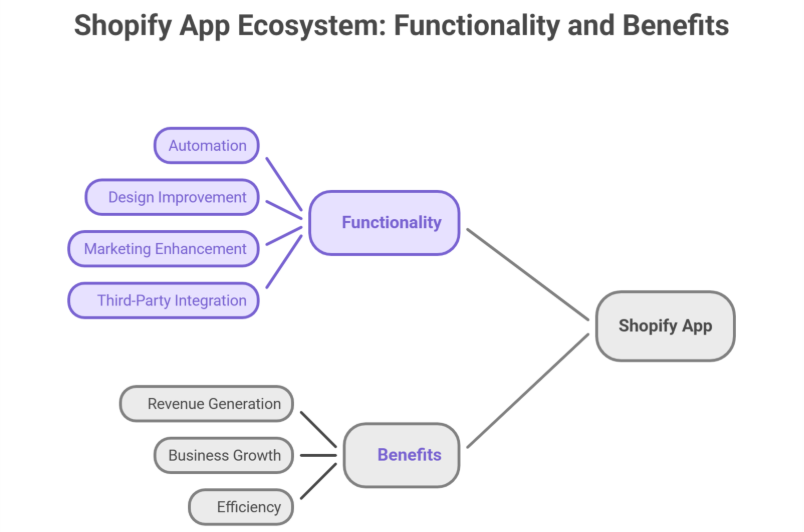
A Shopify app is a software solution. It provides additional high functionality to store owners. These apps can:
- Completely automate processes like inventory management and order fulfillment.
- Highly improve your app for the store design and user experience.
- Enhance marketing and sales strategies.
- Connect third-party services with stores, supporting multiple storefronts.
There are two types of Shopify apps:
- Public Apps: Readily available on the App Store. Accessible to all merchants.
- Custom Apps: Built for a specific store and not listed publicly, supporting custom app solutions and specific business requirements.
Why Develop a Shopify App?
With thousands of businesses using Shopify, there is a growing demand for scalable apps that enhance store functionality. Some key benefits of developing an app include:
-
Revenue Generation: Developers can monetize your app via subscriptions, one-time charges, or other methods to monetize your app.
-
Business Growth: Agencies and freelancers can offer development services to create a robust app for clients.
-
Automation & Efficiency: Store owners save a lot of time by automating repetitive tasks, improving app functions, and app performance.
Essential Tools for Shopify App Development
Complete development of an app requires the right set of tools. Here are some must-have resources for a Shopify developer:
Shopify CLI (Command Line Interface)
The CLI pretty much simplifies development, automating common tasks like authentication, project setup, app setup, and quick testing.
Partners Dashboard
Before you start coding, register as a Partner to gain access to the dashboard, development tools, API keys, and local development environments.
Shopify API
The API is the backbone of creating an app. Allowing apps to interact totally with the store data. The key APIs include:
- Admin API – Manages admin, store data, products, and orders.
- Storefront API – Enables custom storefront experiences.
- GraphQL API – Allows efficient API calls with minimal requests.
Ngrok
Since a secure HTTPS connection is required, Ngrok provides an easy way to expose your backend local development server to the web.
React & Polaris UI Framework
For building user-friendly interfaces, Shopify provides its Polaris design system, a UI framework designed for apps. Using React ensures smooth performance for an app using JavaScript.
How to Develop a Shopify App
Set Up Your Development Environment
- Install Node.js and CLI on your system.
- Register your app in the Partners Dashboard to get API keys.
- Use Ngrok to create a secure tunnel for local development.
Choose Your App Type
-
Embedded Apps: Run inside the admin panel using App Bridge.
-
Standalone Apps: Operate independently but still interact with stores via APIs.
Authenticate Your App
Authentication is a very crucial step in app development. Use OAuth 2.0 to securely connect with stores, ensuring security best practices.
Utilize APIs
- Use the Admin API to fetch product and order data.
- Leverage the Storefront API for customizing front-end experiences.
- Optimize API calls using GraphQL for faster app performance.
Develop the App’s Features
- Implement app functionality based on business requirements.
- Use webhooks to trigger real-time updates when sudden changes occur in the store.
- Ensure the app is mobile-friendly for merchants using Shopify on their phones.
Test the App
- Run tests in a store before deployment.
- Use CLI’s dev mode to test real-time updates.
- Monitor app performance, API calls, and error logs to ensure smooth functionality.
Deploy & Launch
- Host the app on a reliable platform like Heroku or AWS.
- Submit your public apps for review if listed on the App Store.
- Provide detailed documentation and support for users, helping achieve a successful launch.
Best Practices for Shopify App Development
Focus on Performance
- Optimize API calls to reduce server load.
- Minimize unnecessary background processes and implement a cache for better response times.
Ensure Data Security
- Use OAuth authentication to protect store data.
- Encrypt sensitive customer information and implement SSL certificates.
Follow Design Guidelines
- Use Polaris for a consistent UI/UX experience.
- Ensure a clean, intuitive design that aligns with design standards.
- Keep forms and navigation elements simple to improve user experience.
Make Your App Scalable
- Use the microservices architecture for flexibility.
- Optimize database queries for handling large stores.
- Support multi-language and multi-currency features for scalable apps targeting Plus merchants.
Provide Excellent Documentation & Support
- Offer clear installation and app setup guides.
- Include troubleshooting steps for common issues and provide highly responsive customer support to resolve queries.
Common Challenges in Development & How to Overcome Them
API Rate Limits
- Shopify imposes API rate limits, which can slow down requests. To avoid this:
- Use GraphQL API for optimized data fetching.
- Implement request queuing to prevent exceeding limits.
Handling Webhooks Efficiently
- Webhooks are essential for real-time updates, but mismanagement can lead to performance issues.
- Use a message queue like RabbitMQ to handle incoming webhook requests.
- Ensure webhook retries for failed responses.
App Approval Process
- If you’re launching public apps, you must pass the approval process.
- Follow App Store requirements strictly.
- Test your app thoroughly before submission to avoid common pitfalls.
Conclusion
Developing an app in 2026 presents very exciting opportunities for Shopify development. By leveraging the right tools like CLI, APIs, React, Polaris, and following best practices for app development, you can create a robust, scalable app that enhances store data access, improves user experience, and supports automation.
Whether you’re building an app for personal use or launching on the App Store, structured development processes and focusing on best practices will set you up for a successful launch and long-term growth.